How It Works
Every recording below is the real tool, running exactly as it does when you use it — nothing staged. Try the "network requests sent: 0" claim on the tool pages themselves, where it's actually being made.
JSON Formatter & Validator
Paste JSON and watch it format live, catch mistakes as you type, and copy the result — all without a round trip to a server.
- Paste or type JSON into the input box — it formats live as you type.
- Click "Show minified instead" to toggle between formatted and minified output.
- Click "Copy" to copy whichever version is showing to your clipboard.
JWT Decoder
Paste a token to see its header and payload decoded instantly, plus an at-a-glance read on whether it's expired.
- Paste a JWT into the token box.
- Its header and payload appear decoded on the right, immediately.
- If the token has an "exp" claim, an expiry line tells you whether it has already expired.
UUID & Hash Generator
Generate a fresh UUID v4 with one click, or hash any text with SHA-1/256/384/512 using your browser's own Web Crypto API.
- Click "Generate new" for a fresh random UUID v4 — click again any time for another.
- Type or paste text into the hash box to see SHA-1, SHA-256, SHA-384, and SHA-512 digests appear.
- Click "Copy" next to the UUID to copy it to your clipboard.
JSON Formatter — Batch Mode (Pro)
Pro unlocks batch mode: format a whole stack of JSON documents at once, each one validated independently, still entirely in your browser.
- Paste multiple JSON documents into the batch box, each separated by a line containing "---".
- Click "Format all" — every item formats independently, with a ✓ or ✗ showing which ones parsed.
- Click "Copy all formatted" to copy every successfully formatted item to your clipboard.
UUID & Hash Generator — Batch Mode (Pro)
Pro unlocks batch mode: generate dozens of UUIDs at once, or hash a whole list of values in one pass.
- Set a count and click "Generate" to produce that many UUID v4 values at once.
- Click "Copy all" to copy the whole batch to your clipboard.
- Paste multiple lines into the batch hash box, pick an algorithm, and click "Hash all" to hash every line in one pass.
Regex Tester
Type a pattern and some text to test it against, and watch matches, capture groups, and a live replacement preview update as you type.
- Type a pattern (and optional flags) into the pattern box.
- Paste or type text into the test string box — matches and capture groups appear below it live.
- Type a replacement to preview the result of replacing every match, then click "Copy" to copy it.
Timestamp Converter
Convert a Unix timestamp to a readable date, or a date to a Unix timestamp — both directions update live as you type.
- Click "Now" to fill in the current Unix timestamp, or type/paste one of your own.
- Its detected unit, ISO 8601, UTC, local time, and relative time appear immediately.
- Type a date into the other box to convert it back to seconds and milliseconds.
X.509 Certificate Decoder
Paste a PEM certificate or a whole chain to read who it's for, who issued it, when it expires, and what it's allowed to do — decoded locally, never uploaded.
- Paste a PEM certificate (or a chain) into the box, or click "Load sample certificate" to try it with one.
- Each certificate shows its subject, issuer, expiry, hostnames (SANs), key, and SHA-256 and SHA-1 fingerprints.
- Expand "All extensions" to see every extension, including which are marked critical.
Base64 Encoder & Decoder
Encode text (or a file) to Base64 and decode it back, including the URL-safe variant used in JWTs — entirely in your browser, with full Unicode support.
- Type or paste text into the input box — the Base64 output appears as you type.
- Tick "URL-safe alphabet" to swap + and / for - and _ (the Base64URL form used in JWTs).
- Click "Swap input and output" to switch to decode mode and confirm it round-trips back to your text.
URL Encoder, Decoder & Query Parser
Percent-encode or decode text for use in URLs, and paste any URL to see its host, path and every query parameter decoded — entirely in your browser.
- Choose Encode or Decode, pick an encoding style (component, full URL or form), and type or paste your text.
- Click "Swap input and output" to check that it round-trips back to the original.
- Paste a URL or query string into the parser to see its parts and a table of every decoded parameter, with repeated keys marked.
Cron Expression Explainer
Paste a cron schedule to read it in plain English, see how each field is interpreted, and get the next 10 run times in your local time or UTC.
- Type or paste a five-field cron expression, or pick one of the example schedules.
- Read the plain-English sentence and the field-by-field breakdown, including any warnings about how cron treats it.
- Check the next 10 run times, and switch between your local time zone and UTC.
chmod Calculator
Convert Unix file permissions between octal and the rwxr-xr-x form, see what each class of user can do, and preview a chmod change before you run it.
- Type a numeric mode like 755, paste the permissions column from ls -l, or tick the boxes in the grid.
- Read the octal and symbolic forms, copy either chmod command, and check what the mode allows and any warnings.
- Type a change such as u+x or go-w under "Preview a change" to see its effect, then apply it.
HTML Entity Encoder & Decoder
Escape text for HTML or decode entities the way a browser does, with warnings for the mistakes browsers quietly accept, and search all 2,125 named entities.
- Choose Encode, pick which characters to encode and whether to write them as named, decimal or hex references, and type or paste your text.
- Switch to Decode to turn entities back into characters, and read any warnings about missing semicolons, unknown names or double encoding.
- Search the entity list by name, character or code point to find the reference you need.
Format Identifier
Paste a string you don't recognize to find out what it is, see why it matched, and open it in the right tool with the value already filled in.
- Paste the string: a token, a certificate, a schedule, an encoded value or anything else.
- Read what it looks like and why. When several formats fit, they are ranked, most likely first.
- Open the suggested tool. The value goes with you, in this tab only, never in the URL.
CLI — Install & Explore
The same tools as a CLI for CI pipelines and scripts, where a browser tool can’t run headlessly. Install it globally and see the full command tree.
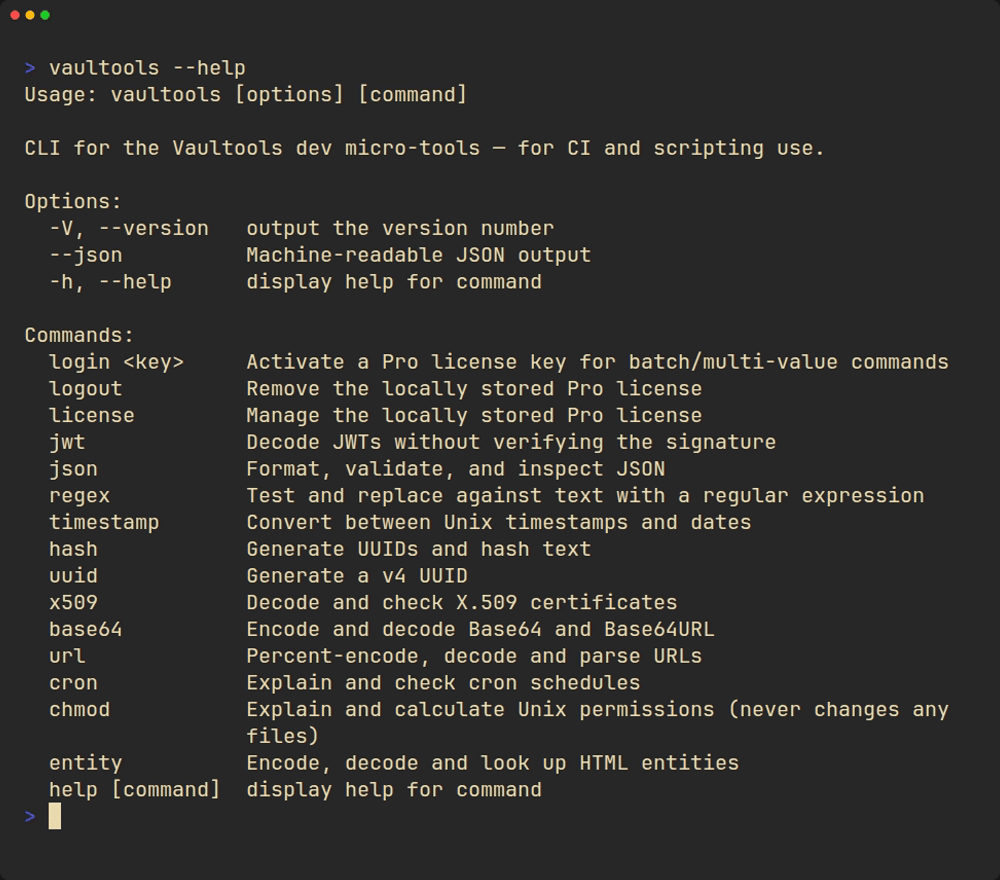
- Install globally: `npm install -g vaultools` (or run it once with `npx vaultools`).
- `vaultools --version` confirms it installed correctly.
- `vaultools --help` lists every command — one per tool, plus the Pro batch variants.
CLI — A Real Session
A free command, a stdin pipe, and the real Pro batch gate — nothing staged, no license activated for this recording.
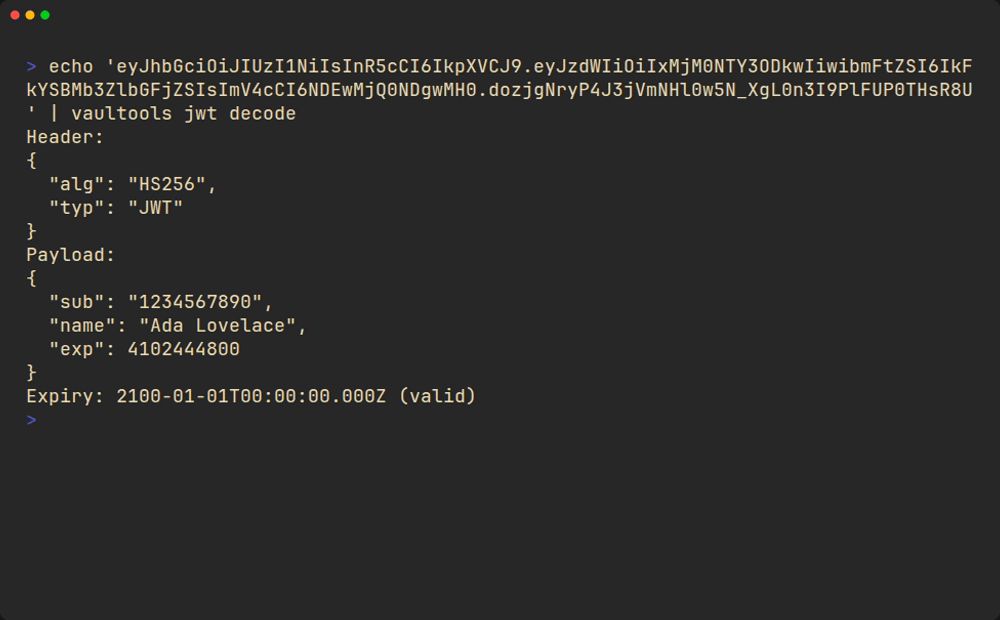
- Pipe input directly, e.g. `echo '{...}' | vaultools json format` — every command accepts stdin or a file path.
- Same for `vaultools jwt decode` — no browser required.
- Batch/multi-value commands like `vaultools json batch` require a Pro license — this shows the real gate, not a staged success.
Ads on this page
Non-personalized ads help keep Vaultools free — Google decides where they appear on the page.
Go Pro to remove them →